
A floorplan-based inspection app helps property inspectors record findings and indicate where defects occur within a property. When choosing a solution, evaluate not only its floor plan features but also how well it supports photographs, reporting, case management and the overall inspection workflow.
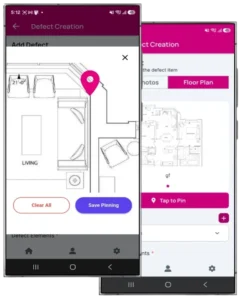
1. Simple floor plan uploading
The app should make it practical to add a floor plan that corresponds to the property being inspected. Check supported file formats, image clarity and how the system handles plans with multiple floors or different unit layouts.
2. Accurate defect pinpointing
Inspectors should be able to place markers at the approximate locations of findings without an unnecessarily complicated process. Check whether markers remain visible, can be associated with individual defect records and appear correctly in the final report.
3. Direct photo association
The app should make it easy to attach photographs to the relevant defect. This helps preserve the connection between location, description and visual evidence. Evaluate whether multiple photographs can be associated with one finding and whether images remain correctly linked during export.
4. Structured defect recording
Look for practical fields for defect references, locations, descriptions and categories. Reusable categories and templates can improve consistency, provided inspectors can still record findings that fall outside predefined options.
5. Professional PDF report generation
Check whether the app can generate reports with readable layouts, clear photographs, floor plan markers and consistent defect numbering. If company branding is important, evaluate the available logo, cover page, header, footer and template customization options.
6. Mobile usability
The app should work comfortably on the devices inspectors use in the field. Test adding defects, taking photographs, moving between records and marking floor plans during a realistic inspection rather than relying solely on a demonstration.
7. Case and team management
For inspection businesses, consider whether the system supports multiple cases, inspector accounts, appropriate access permissions and a centralised record history. Check which functions are included in each subscription plan and whether user or usage limits apply.
8. Connectivity and data protection
Determine whether the app supports offline work, how data synchronises and what happens when a connection is interrupted. Review access controls, data storage, backup arrangements and export options before storing sensitive property records.
9. Rectification and follow-up capabilities
If the service includes repair tracking, check whether defect records can retain their original references while repair evidence and verification outcomes are added. The system should clearly distinguish submitted repair evidence from independently verified completion where that distinction is required.
10. Pricing and long-term suitability
Compare subscription fees, user limits, reporting limits, storage allowances, training requirements and support arrangements. Consider the total cost of the workflow, including the administrative work the software may reduce.
***Frequently Asked Questions***
What is the main benefit of a floorplan-based inspection app?
It connects defect records to their approximate physical locations, making findings easier to locate and understand.
Is floor plan marking enough to make an inspection app professional?
No. Good reporting also requires accurate descriptions, photographic evidence, consistent references and a reliable process for managing inspection records.
Should freelance inspectors and larger companies choose the same app?
Not necessarily. Freelancers may prioritize simplicity and report generation, while larger teams may also need shared case management, multiple inspector accounts and administrative controls.
***Conclusion***
The right floor plan based inspection app should connect location mapping, defect documentation, photographs and professional reporting in one practical workflow. Test these functions against real inspection tasks and choose a solution that matches your service scope, team size and reporting requirements.


